Shopify blog app · On the Shopify App Store
The AI blog app for Shopify that writes and publishes your store's articles
BlogTend researches each topic, writes a cited article with a featured image and publishes it to your Shopify blog — live or as a draft — once, in bulk, or on a schedule you set. Run a Webflow or Wix site as well? It publishes there too.
3 free articles, no card · Paid plans from $29/mo
Free to start · No card required · Two ways in, explained below

- Try it before you connect a site
- Free plan, no card required
- Draft-for-review mode
- First month back if nothing gets published
From the real product
The research behind each store article
A short clip from the product tour. The same research runs whichever platform the article is for.
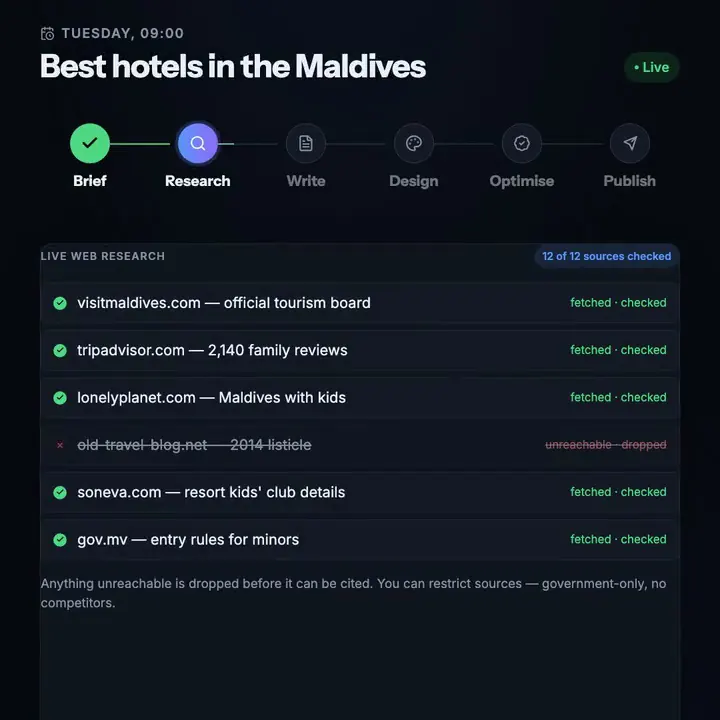
Live research, checked before it is cited
Sources are fetched one by one and marked checked; a dead link is dropped instead of cited.

Cut from the product tour, recorded on a demo site. No sound; the full tour with narration is below.
Real output, not a mock-up
Our own blog is written by BlogTend
Every post on blogtend.com/blog is researched, written and published by a BlogTend automation — the same pipeline you get, connected to our site by webhook. These are the latest three, as they went live.
Publishing Workflows AutomationSep 30, 2026
How to Implement Web Integration for Blog Content Automation
Connect AI writing engines to your blog through REST APIs and plugin bridges for fully automated publishing. This technical walkthrough covers authentication, webhook triggers, theme compatibility, SEO metadata injection, and production error handling.
1,936 words · 10 min read · 7 sections · 2 tables
Written by BlogTendRead itTravel PlanningSep 29, 2026
Travel Blogging Automation: Practical Use Cases to Streamline Content Creation and Monetization
Practical automation workflows for travel bloggers: automated itinerary generation, seasonal content scheduling, affiliate link insertion, and voice preservation techniques that scale publishing without sacrificing accuracy.
2,341 words · 12 min read · 8 sections · 2 tables
Written by BlogTendRead itWordPressSep 28, 2026
How to Automate Blog Management on WordPress for Time-Strapped Professionals
Manual blog management consumes 6 to 8 hours per post. Learn how to automate your entire WordPress workflow with BlogTend, from live research and AI drafting to SEO metadata and scheduled publishing.
1,584 words · 8 min read · 8 sections · 1 table
Written by BlogTendRead it
Two ways in, same product
Start on blogtend.com, or install from Shopify
Both publish to the same store blog with the same articles. The difference is where you sign up and who bills you.
Option 1
Start free on blogtend.com
Create your account here, then add your store under Sites and approve the install in Shopify. Your plan is billed by BlogTend in US dollars, and you manage everything from the full dashboard.
- Free plan, no card
- First month back if nothing gets published
- One account for Shopify and any other sites you run
- Automations, bulk articles and internal linking in the dashboard
Option 2
Install from the Shopify App Store
Find BlogTend on the Shopify App Store and select Install. It opens inside your Shopify admin, already connected, with your account created from the store owner's email. Billing runs through Shopify.
- Write single articles from inside Shopify admin
- Plan changes and cancellation on your Shopify pricing page
- The full BlogTend dashboard is still there when you want it
Step-by-step instructions are in the Shopify connection guide.
Two minutes, start to finish
Watch one article go from a topic to a published post
The real product, recorded end to end: connecting a site, setting a topic and a rhythm, the run itself, and the finished article live on the blog.
Made for store blogs
Blog posts your store can stand behind
Researched, with sources
On paid plans each article starts with live web research, and on the Free plan your first 3 do — the sources it used are listed in the post, useful when you write about materials, care or buying advice.
Draft or live, your call
Send an article as a draft and it waits unpublished under Blog posts until you publish it. Send it live and it publishes immediately.
Featured image included
Every article gets its own generated featured image, uploaded to your store's files. Turn images off if you prefer your own.
A schedule that keeps the blog alive
Pick a rhythm — daily, weekly, monthly — and new posts keep arriving without anyone remembering to write them.
Refresh old posts in place
A refresh rewrites the same blog post at the same URL, so it keeps its history instead of competing with a copy of itself.
Your blog, your author name
Choose which of your store's blogs to publish to and the author name shown on each post.
What you get
Exactly what is included — and what is not
Read from the live plans. The Free plan has no trial clock; paid plans add research and SEO fields on every article.
Free plan · no card, no trial clock
- 3 free articles to start, no card needed
- 1 site
- Live web research on your first 3 articles
- Featured image and publishing included
- Publish live, save a draft, or hold for review
Paid plans · from $29/mo
- Starter: 20 articles a month at Standard — a post every day
- 3 sites
- Unlimited automations
- Live web research with cited sources on every article
- Yoast and Rank Math fields filled in
- Failed runs refunded automatically · Cancel anytime
First month back if nothing gets published
Subscribe on blogtend.com. If nothing is published to your site in your first 30 days and you have generated fewer than 3 articles, claim that first month back from the Billing page in one click. Once per account.
What we do not promise: rankings or traffic. BlogTend researches, writes, fills the SEO fields and publishes; search engines decide the rest.
How it works
From store to first blog post
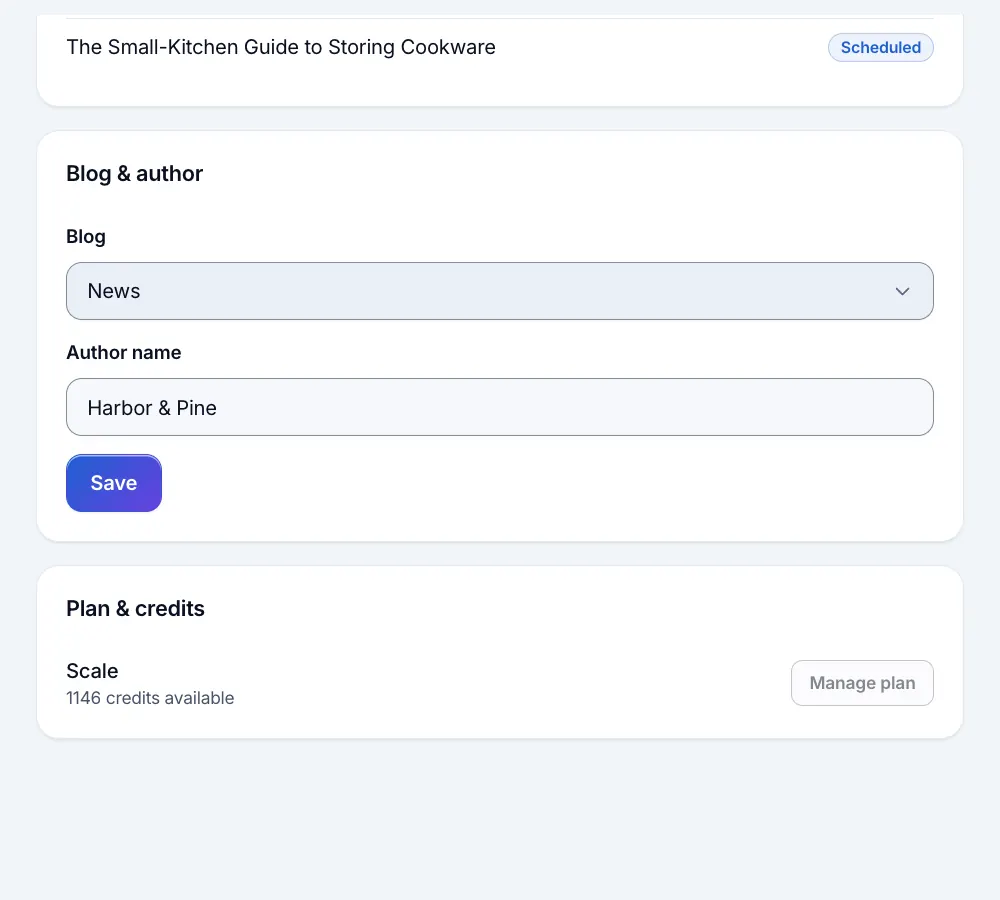 1
1Connect your store
Start free on blogtend.com and add Shopify under Sites, or install from the Shopify App Store.
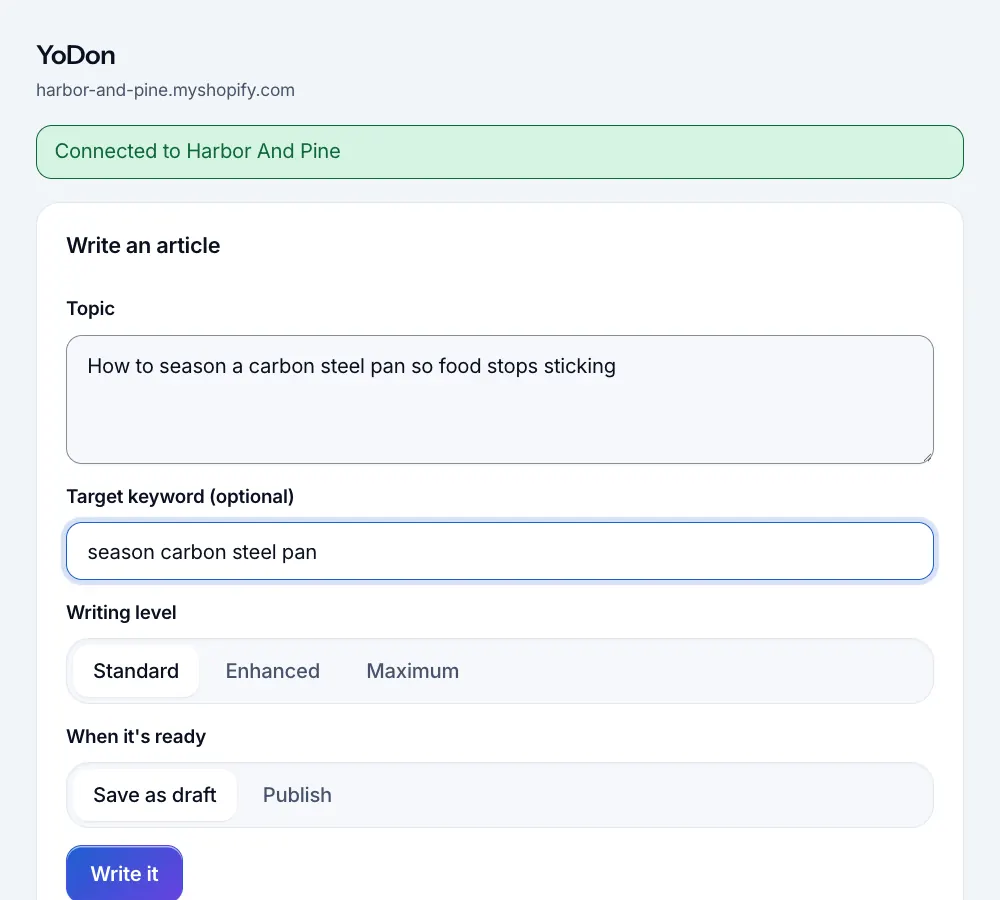 2
2Name a topic
One article, a list in bulk, or an automation that writes on a rhythm. Only the subject is required.
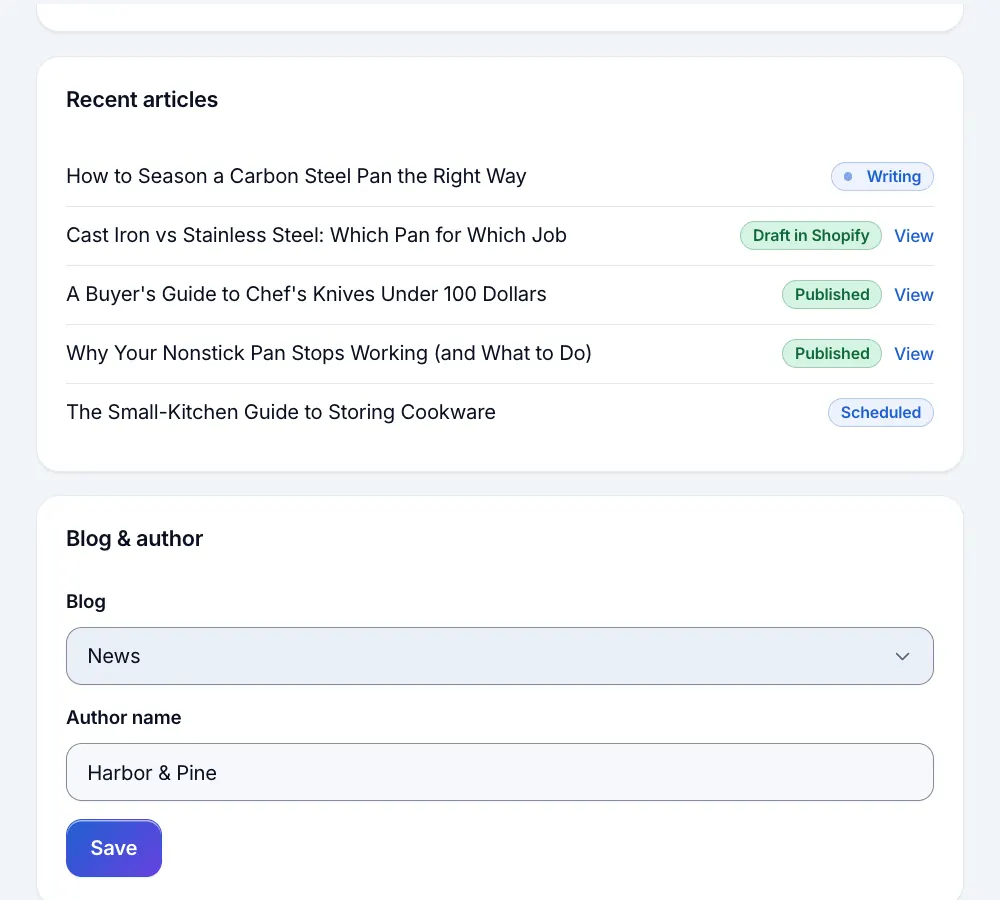 3
3It posts to your blog
Researched, written and illustrated, then published to your Shopify blog or saved as a draft.


Pricing
Priced per finished article
These are the plans for accounts started on blogtend.com, billed by BlogTend in US dollars. If you install from the Shopify App Store instead, billing runs through Shopify and your plans show on the app's pricing page in Shopify admin. One credit is one finished article at the Standard writing level; Enhanced costs 2 and Maximum 3.
Free
$0.00/mo
3 free articles to start, no card needed
1 site
Live web research on your first 3 articles
Starter
$29/mo
20 articles a month at Standard — a post every day
3 sites
Live web research with cited sources
- Most popular
Growth
$79/mo
60 articles a month at Standard — 14 posts a week
10 sites
Live web research with cited sources
Scale
$199/mo
180 articles a month at Standard — 6 posts a day
25 sites
Live web research with cited sources
Questions
Is BlogTend on the Shopify App Store?
Which should I choose: blogtend.com or the App Store?
I already have a blogtend.com subscription. What happens if I install the app?
Can I review posts before they appear on my store?
What permissions does it need?
Will it get my store more traffic?
Do I need a website to try it?
Is AI-written content OK for Google?
Put your store's blog on autopilot
Start free on blogtend.com and connect your store in a couple of minutes — or install from the Shopify App Store if you prefer.